To change the starting chat tabs or adjust their message types you can go to the BP_Chat widget in the Content Browser and then go to the Graph view, then find the nodes shown in the image below.
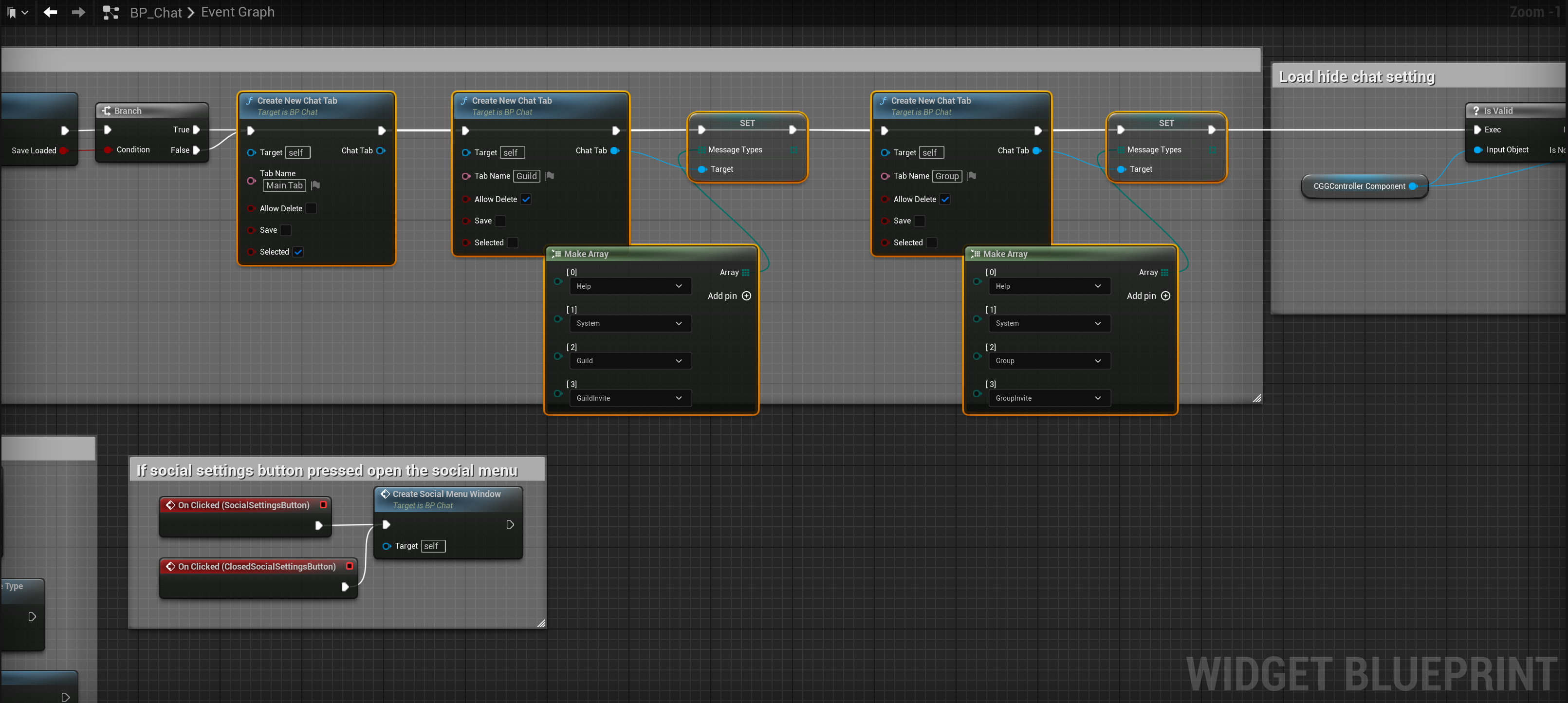
Here you can see a Create New Chat Tab node for each of the default chat tabs. You can also see how the Message Types for those chats are set, here you can click the Add pin option on the Make array nodes to add new message types or right click the message type and select the Remove array element pin to remove one.
You can also change the Tab Name on the Create New Chat Tab nodes and change if that chat tab can be deleted.
Applying Changes
After making any changes to this code you will need to delete the old Chat Groups Guilds save file as it will load up the old tab settings from the previous save, to do this copy the video below. After you do this when you next play it should use the new default settings you’ve setup.
Remove Chat Tab
To remove a chat tab select the Create New Chat Tab node and delete it, but make sure to connect up the code to next nodes after doing this like the video below.
Adding New Chat Tab
To add new default chat tab create a new Create New Chat Tab node and connect it to the end of the existing nodes like the image below, then fill out its Tab Name and if you want to set its Message Types drag out from the Chat Tab output and use the Set Message Types node, then connect a make array node to the Set Message Types node and set the Message Types you want to use like shown in the video below.
 Defuse Studios