To change a device’s settings go to the device blueprint so for example the BP_Generator and select the BP_MasterPowerComponent in the Components panel, then in the Details panel find the Power Settings category and in that category you will find the Generated Power settings.
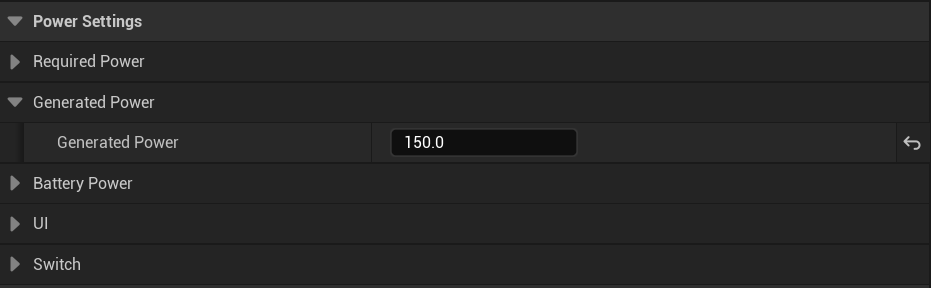
Here you can change this device’s Generated Power settings, you can hover your mouse over each settings name to get a tooltip with more info about each setting.
Generated Power – This is the amount of power this device will produce.
Wind Turbine
Devices that use the BP_WindTurbinePowerComponent like the BP_WindTurbine use different settings to determine their generated power. You can find these settings in the device’s blueprint select the BP_WindTurbinePowerComponent and in the Details panel find the Wind Power Settings.
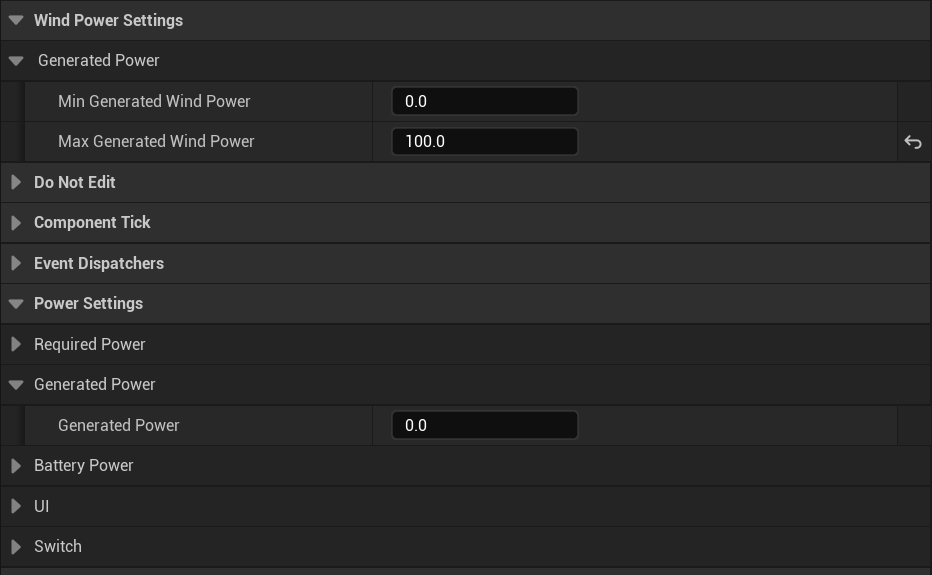
Wind turbines use the Wind Speed variable found in the BP_WindSpeedManager to determine how much power to provide, this Wind Speed value is between 0 -1
Generated Power – This setting is ignored by BP_WindTurbinePowerComponents, instead use the Min Generated Wind Power and Max Generated Wind Power settings.
Min Generated Wind Power – This is the amount of power that is generated when the Wind Speed is 0
Max Generated Wind Power – This is the amount of power that is generated when the Wind Speed is 1
When the Wind Speed value is between 0 -1 for example 0.5 the wind turbine will generate the value half way between the Min and Max Generated Wind Power values.
 Defuse Studios