Player Electricity System includes a save system that saves and loads the state of all the power systems objects like the devices and cables as well as the players current location and resource amounts. It will not save actors or variables that did not come with Player Electricity System.
To change the save systems settings go to the BP_PESSaveSystem blueprint and click Class Defaults, like shown in the image below.
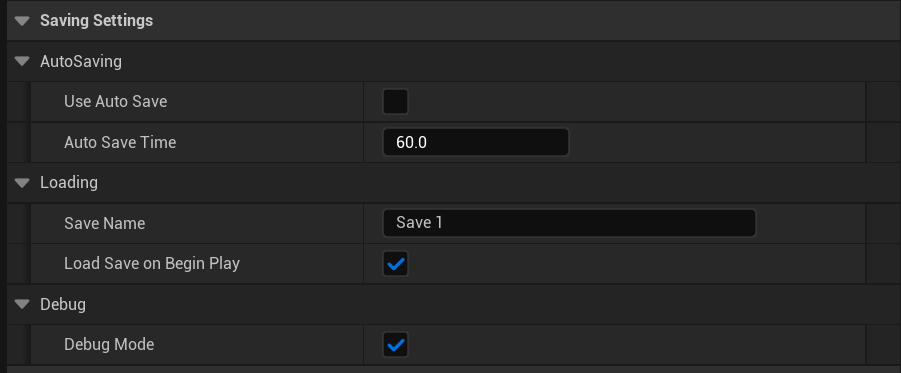
Here you can change the load, auto save and debug settings, you can mouse over the setting names to get tooltips.
Auto Save
The system can be set to Use Auto Save, if ticked on the save system will save the game after a set number of seconds, the number of seconds is controlled by the Auto Save Time setting, so for example if this is set to 100, the game will save every 100 seconds.
The auto save will create a save file with the name thats set in the Save Name setting in the Loading category.
Loading
If Load Save on Begin Play is ticked on the save system will attempt to load the save game file when the game starts, the save game file it loads is controlled by the Save Name setting. If no save is found then the save system will do nothing.
Debug
The save system will print messages on screen during gameplay when loading or saving, this can be disabled by unticking the Debug Mode.
 Defuse Studios