Go to the BP_MasterAttachment and create a new variable called AdditionalFireMode and set its Type to E_FireModes then tick on Instance Editable in the variable settings. Then compile and set the Default Value to None.
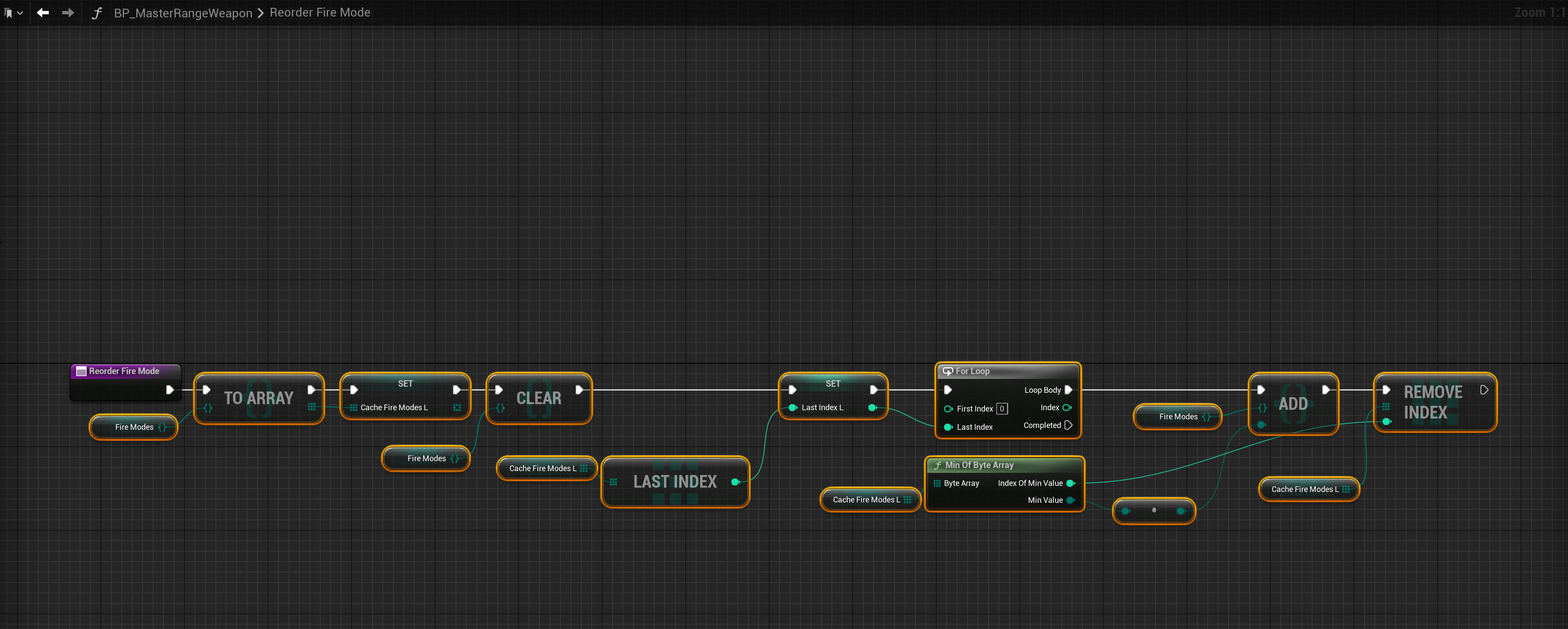
Next go to the BP_MasterRangeWeapon and create a new function called ReorderFireMode. Then in that function create a new local variable called CacheFireModesL and set its type to E_FireModes and set it to an Array.
Next create another local variable and call it LastIndexL and set its type to Integer. Then copy the image below.
Next go to the ApplyRangeWeaponAttachmentStats function and add the highlighed nodes in the image below.

Next go to the RemoveRangeWeaponAttachmentStats function and add the highlighed nodes in the image below.

Next go to the Event Graph then to the Attachments collapsed node and add the highlighted nodes shown in the image below.

You can now set the Additonal Fire Mode setting in the Class Defaults of any weapon attachment blueprint, this will add the fire mode to the weapon its attached to and remove the fire mode when the attachment is removed from the weapon.
 Defuse Studios