Go to the BP_MasterRespawnPoint blueprint and create a new variable called CurrentRespawnCooldown and set its type to Integer and set its Default Value to 0. Then set its Replication setting to Replicated.
Then create another variable called RespawnCooldown and set its type to Integer, tick on Instance Editable and set its Default Value to 25, this is the default number of seconds the respawn point will be on cooldown after someone uses it to spawn, you can set this value to whatever you like.
Next create another variable called CooldownTimer and set its type to TimerHandle
Then create another variable called UseRespawnCooldown set its type to Boolean and tick on Instance Editable and tick on the Default Value
Then create a new function called StartRespawnCooldownTimer and copy the image below.

Then create a new function called UpdateRespawnCooldownTimer and copy the image below.

Next go to the BP_DeathScreen and create a new variable called RespawnPoint and set its type to BP_MasterRespawnPoint
Then create another variable called RespawnButtonUpdateTimer and set its type to TimerHandle
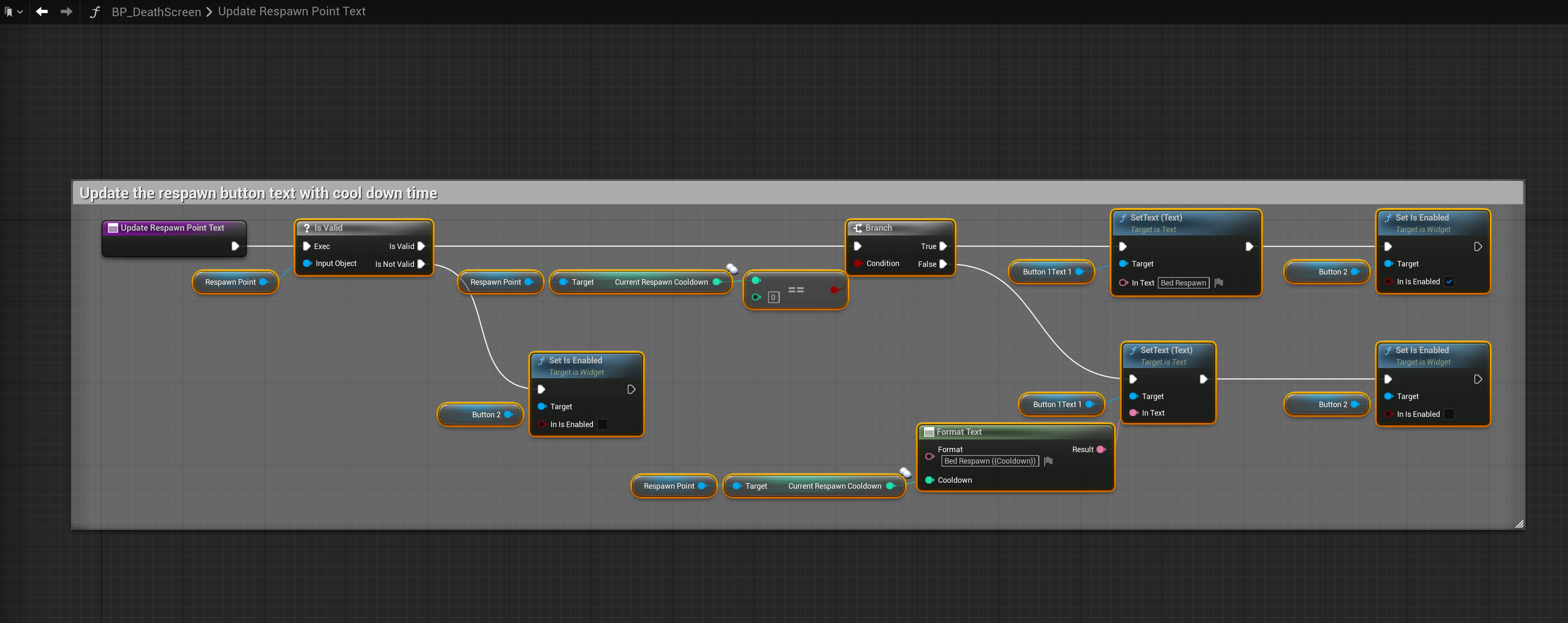
Next create a new function called UpdateRespawnPointText and copy the image below.
Then go to the Event Graph in the BP_DeathScreen and copy the image below.

Next go to the BP_PlayerInventory and then go to the FindSpawnPoint function and add the nodes shown in the image below.

 Defuse Studios