Go to the ItemList and copy the video below, in this example I duplicate the Holdable_B7Grenade you can do the same then edit its settings, like row name, item name, static mesh, UI Details etc for your new item. For more info on these settings you can watch the adding new items video.
Next in the Content Browser go to the Blueprints/Projectile folder, if your adding an explosive throwable you can duplicate the BP_GrenadeProjectile. If its not an explosive you can right click the BP_MasterThrowable blueprint and select the Create Child Blueprint Class option and name the name blueprint for this example mine will be called BP_NewThrowableProjectile.
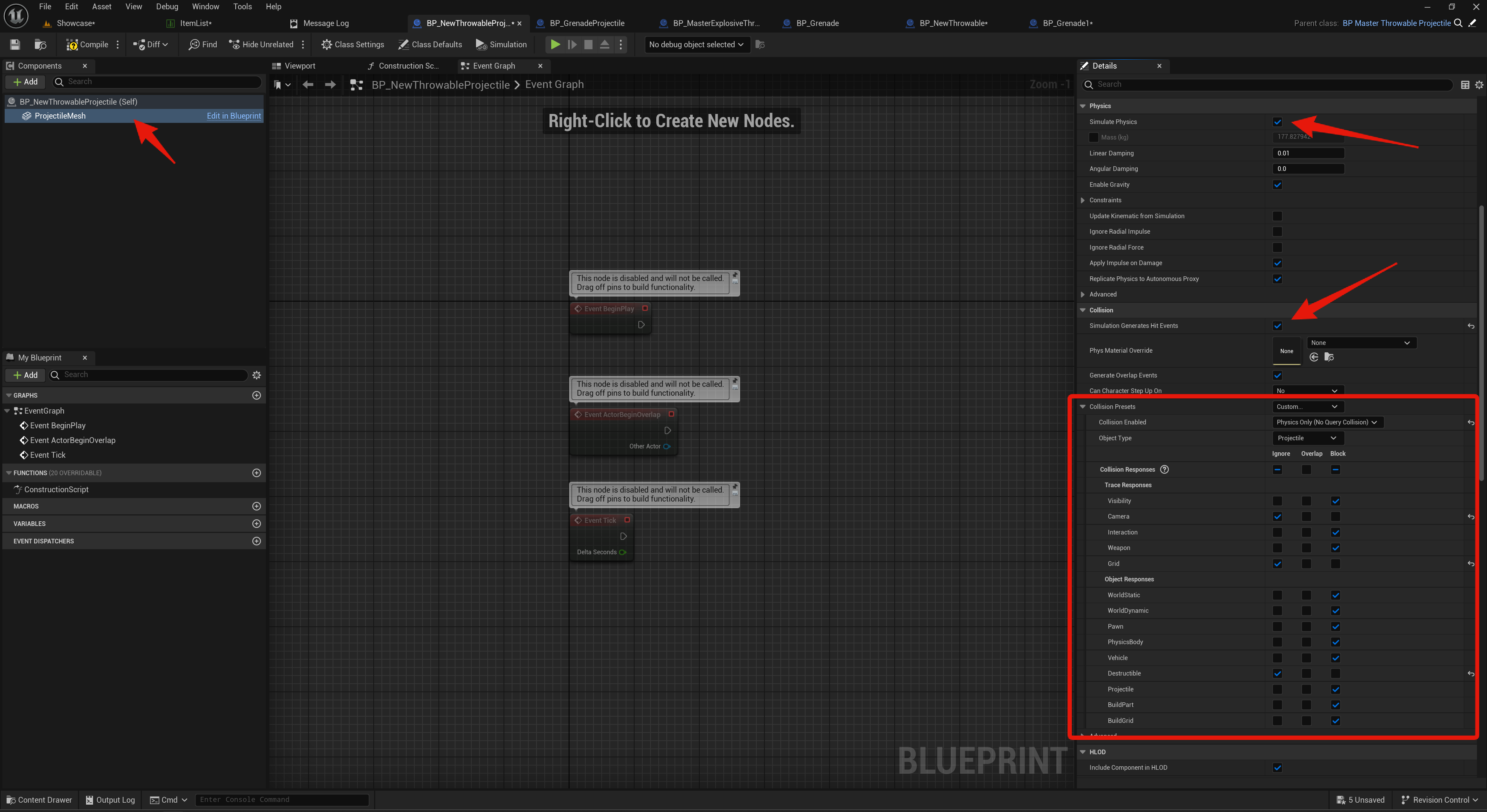
Then open the new blueprint and in the Components panel select the Projectile Mesh component and in the Details panel set the Static Mesh you want it to use, make sure this mesh has collision. Then in the Details panel copy the collision and physics settings shown in the image below.
Next in the Content Browser go to the Blueprints/Item/HoldableItems folder, if your creating an explosive throwable right click and duplicate the BP_Granade blueprint. If not right click the BP_MasterThrowable blueprint and select Create Child Blueprint Class option and name the blueprint, for this example mine will be called BP_NewThrowable.
Then open the new blueprint and in its Class Defaults search for Throw Projectile and set this to your new projectile blueprint, for me this is the BP_NewThrowableProjectile.
Note – If you created a child of the BP_MasterThrowable in your new blueprints Class Defaults search for Animation Layer and change the ABP_UnarmedAnimLayers to the ABP_GrenadeAnimLayers.
Note – If you duplicated the BP_Granade blueprint click the blueprint Open Full Blueprint Editor text.
Then in the Components panel select the Static Mesh component and in the Details panel set the Static Mesh to your items mesh.
Next go back to the ItemList and copy the video below.
Next in the Content Browser go to Blueprints/Items/WorldItems and copy the video below, set your Item setting in the blueprint to the Row Name of your new throwable.
This is the blueprint you can place into the level for the player to pickup and throw.
On Hit Event
This is part is optional for if you are not creating an explosive throwable item
you can open your new throwable projectile blueprint, for me this is called BP_NewThrowableProjectile, then click the Open Full Blueprint Editor.
You can create the Event Hit node, this will run when the projectile hits another object, here you can add your own code to do whatever you like when the projectile hits something, below is an example of applying 50 damage to hit objects.
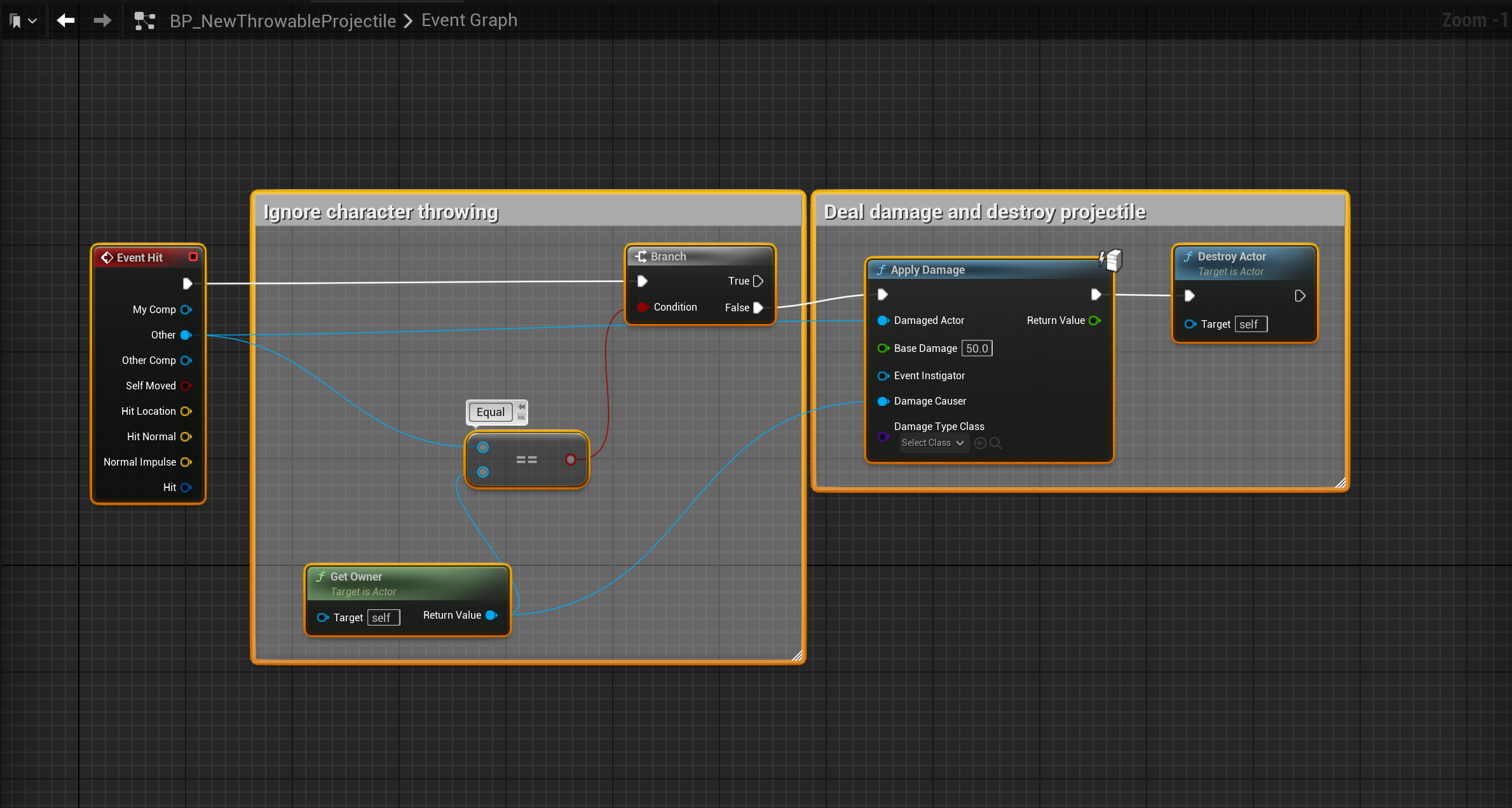
To allow this code to damage the player you will need to go to the BP_SGKMasterCharacter, select the Mesh component in the Components panel and set its Collision Preset to Custom and Set Collision Enabled to Collision Enabled (Query and Physics).
 Defuse Studios