This guide is for UE5 projects version 2.4 or newer
Anim layers are used by holdable items to determine what animations the character should play when that item is held. If you have a custom holdable blueprint and want to create a new anim layer blueprint for it follow the steps below.
To create a new anim layer for a new holdable blueprint go to the Animations/Layers folder here you will see the existing anim layers, you can duplicate an existing anim layer blueprint if your new holdable is similar to an existing holdable for example if your making a melee weapon you may want to duplicate the BP_AxeAnimLayers blueprint.
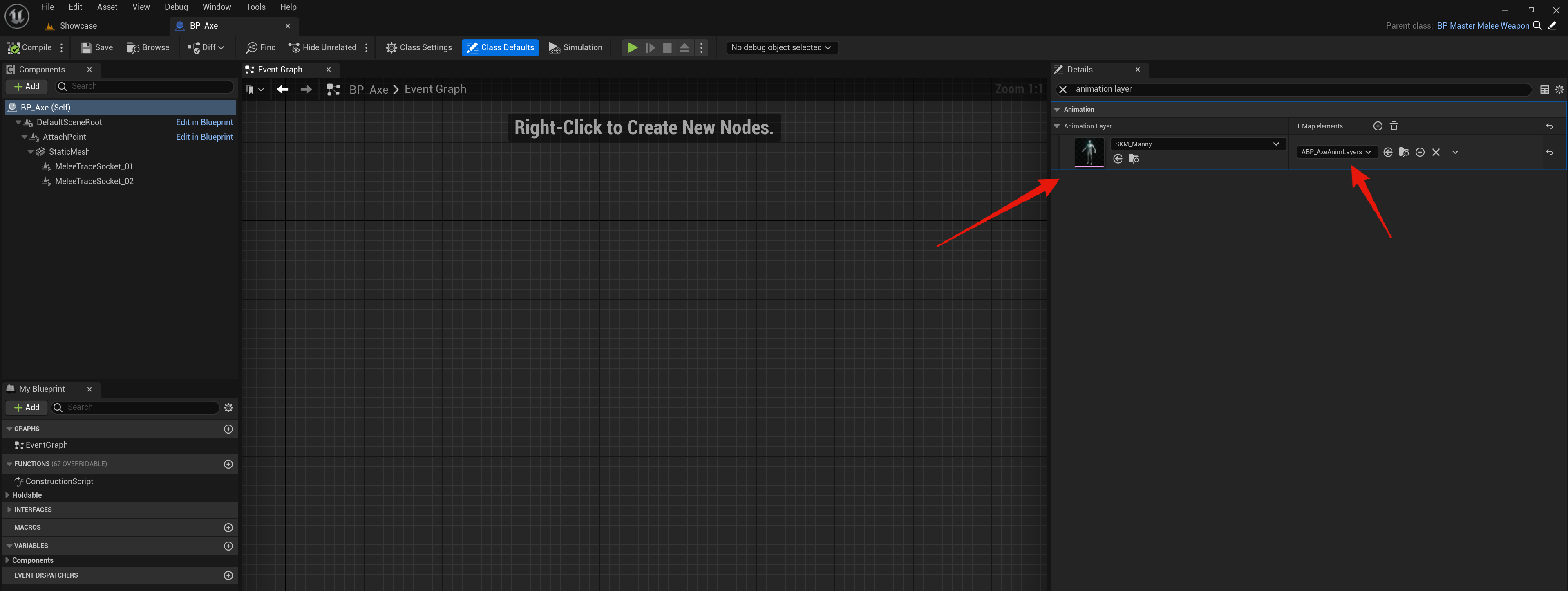
To make a holdable blueprint use your new anim layer go to your items holdable blueprint and in the Class Defaults search for Animation Layer, here you can set an animation layer for a spacific character mesh, this allows you to have the weapon use different animations depending on the character thats holding the weapon.
You can now open your new anim layer blueprint click the Class Defaults button and in the Details panel you can modify its settings to change things like its first and third person animations, hand IKs and aim offsets.
For more info on the anim layer blueprint’s settings check out the guide below.
SGK V2 – Changing Character Animations
 Defuse Studios