This guide is for UE5 versions of Survival Game Kit V2 only
This guide replaces certain animation sequances and montages, if you’ve retargeted this may replace your retargeted animations
Make sure you have the changes from the DIY Guides below before following this guide
Create a new Survival Game Kit V2 project in the Epic Launcher, make sure its the same engine version as your project.
Then open its project folder in windows file explorer and go to the SurvivalGameKitV2/Animations/Seqances/Rifle folder then select and copy the following files.
A_FP_Sprint_Rifle
A_FP_Idle_Rifle
A_FP_SS_Walk_Rifle
A_FP_JumpLand_Rifle
A_FP_Jumploop_Rifle
A_FP_JumpStart_Rifle
A_FP_Fire_Rifle
A_FP_MagAttach_Rifle
Then go to your projects folder then go to the SurvivalGameKitV2/Animations/Seqances/Rifle folder and paste the files into the folder. Make sure your project is closed before doing this.
Then go back to the new Survival Game Kit V2 project folder and go to the SurvivalGameKitV2/Animations/Montages/Rifle folder and select and copy the following files.
AM_FP_Fire_Rifle
Then go to your projects folder then go to the SurvivalGameKitV2/Animations/Montages/Rifle folder and paste the files into the folder. Make sure your project is closed before doing this.
Then go back to the new Survival Game Kit V2 project folder and go to the SurvivalGameKitV2/Animations/Seqances/Shotgun folder and select and copy the following files.
A_FP_Sprint_Shotgun
A_FP_JumpLand_Shotgun
A_FP_Jumploop_Shotgun
A_FP_JumpStart_Shotgun
A_FP_Reload_Start_M1982
A_FP_Reload_Loop_M1982
A_FP_Reload_End_M1982
A_FP_Aimed_Fire_Shotgun
A_Fire_M1982
A_FP_Fire_Shotgun
Then go to your projects folder then go to the SurvivalGameKitV2/Animations/Seqances/Shotgun folder and paste the files into the folder.
Then go back to the new Survival Game Kit V2 project folder and go to the SurvivalGameKitV2/Animations/Montages/Shotgun folder and select and copy the following files.
AM_FP_Aimed_Fire_Shotgun
AM_FP_Fire_Shotgun
Then go to your projects folder then go to the SurvivalGameKitV2/Animations/Montages/Shotgun folder and paste the files into the folder.
Then go back to the new Survival Game Kit V2 project folder and go to the SurvivalGameKitV2/Animations/Seqances/Pistol folder and select and copy the following files.
A_FP_SS_Idle_Pistol
A_FP_SS_Walk_Pistol
A_MagAttach_P1911
A_MagDetach_P1911
A_FP_MagAttach_Pistol
A_FP_MagDetach_Pistol
Then go to your projects folder then go to the SurvivalGameKitV2/Animations/Seqances/Pistol folder and paste the files into the folder.
Then go back to the new Survival Game Kit V2 project folder and go to the SurvivalGameKitV2/Animations/Montages/Pistol folder and select and copy the following files.
AM_FP_Magazine_Attach_Pistol
AM_FP_Magazine_Detach_Pistol
Then go to your projects folder then go to the SurvivalGameKitV2/Animations/Montages/Pistol folder and paste the files into the folder.
Then go back to the new Survival Game Kit V2 project folder and go to the SurvivalGameKitV2/Animations/Seqances/Axe folder and select and copy the following files.
A_FP_Jog_Fwd_Axe
A_FP_JumpLand_Axe
A_FP_JumpLoop_Axe
A_FP_JumpStart_Axe
A_FP_Sprint_Fwd_Axe
Then go to your projects folder then go to the SurvivalGameKitV2/Animations/Seqances/Axe folder and paste the files into the folder.
Then open your project and in the content browser open the ABP_M4A4AnimLayers and copy the video below.
Then open the ABP_M1982AnimLayers and copy the video below.
Then open the ABP_P1911AnimLayers and copy the video below.
Then open the ABP_BaseHoldableAnimLayer and copy the video below.
Then open the ABP_AxeAnimLayers, ABP_PickAxeAnimLayers, ABP_HammerAnimLayer and ABP_KnifeAnimLayers and copy the video below.
Then open the BP_MasterRangeWeapon and create a new variable called FPCharacterFireAnimation and create another variable called FPCharacterAimedFireAnimation set both types to Anim Montage and tick on Instance Editable for both and set their Category to Animation.
Then open the GetFireAnim function and add a new input called FirstPersonArms and set its type to Boolean then copy the image below.
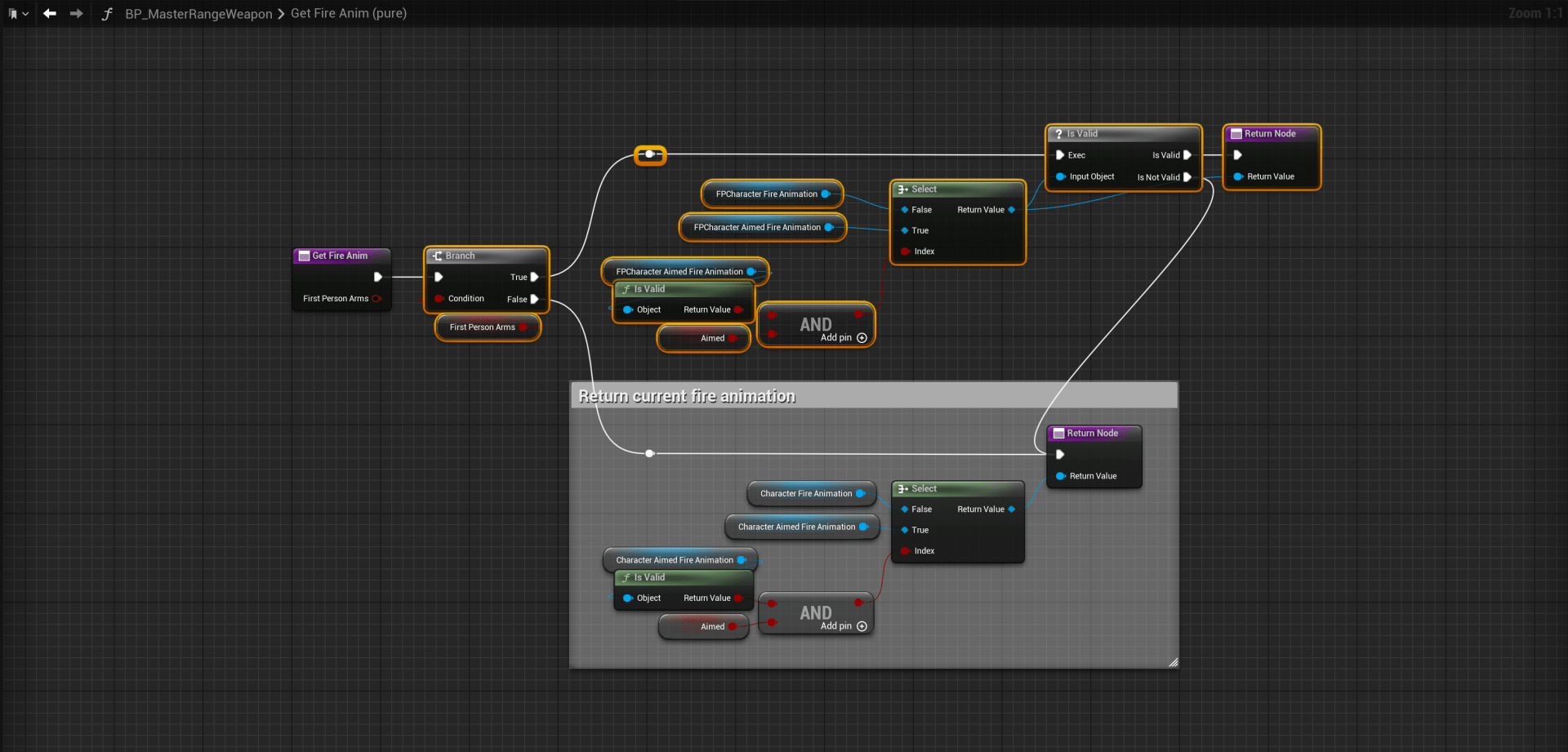
Then open the PlayFireEffects function and tick on the FirstPersonArms input on the highlighted nodes in the image below.

Then open the BP_M1982 and in the Class Defaults find the FPCharacterAimedFire Animation setting and set it to the AM_FP_Aimed_Fire_Shotgun then set the FPCharacterFire to AM_FP_Fire_Shotgun
Then open the BP_M4A4 and in the Class Defaults find the FPCharacterAimedFire Animation setting and set it to the AM_FP_Fire_Rifle then set the FPCharacterFire to AM_FP_Fire_Rifle
The next part is only avalible for projects using unreal engine 5.1 or newer
Open the SK_Mannequin then copy the video below.
 Defuse Studios