Make a backup of your project before following this guide
Open the S_SpawnSettings and add a new variable called NoItemSpawnChance and set its type to Float.
After adding the variable to S_SpawnSettings dont save, play in editor and once your character loads in exit play in editor then save the S_SpawnSettings struct. If your having issue with the project crashing try closing and reopening the project after you save the struct but dont save any of the other blueprints.
Play in editor, once the character loads in your can exit play in editer, if you get an error open the blueprint with the error and compile it, this should resolve the error.
Doing this may reset your storage inventory’s RandomItemSpawning settings so you may need to go into their blueprints, select the BP_MasterInventory and tick back on the SpawnItem settings in the RandomItemSpawning setting If you want that inventory to spawn random items
Then open the BP_MasterInventory blueprint and create a new variable called TotalWeight and set its type to Float.
Then open the ConstructItemSpawnList and create a new local variable called TotalItemWeightL and set its type to Float, then add the highlighted nodes shown in the image below.

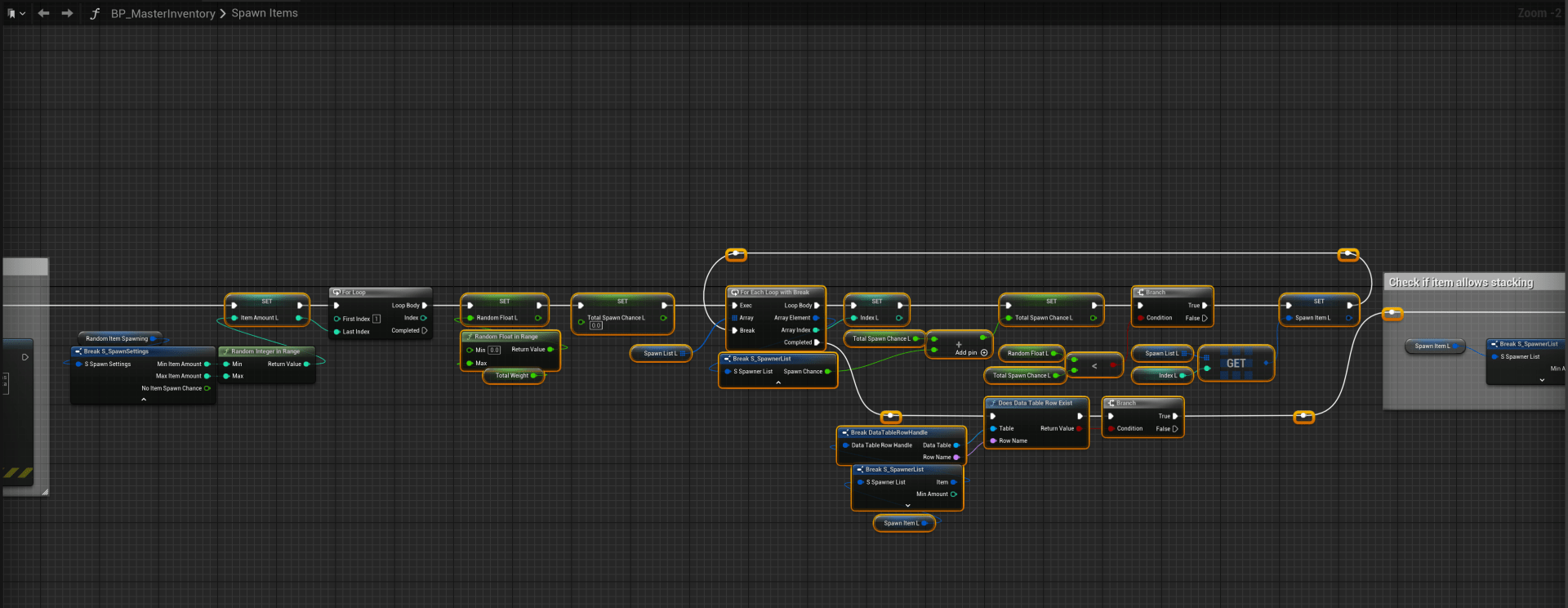
Next open the SpawnItems function and create a new local variable called RandomFloatL and set its type to Float, then create another local variable called IndexL and set its type to Integer, then create another local variable called TotalSpawnChanceL and set its type to Float, then create another local variable called ItemAmountL and set its type to Integer.
Then delete all the highlighted nodes shown in the image below.

Then add all the highlighted nodes shown in the image below.
 Defuse Studios