This is a short guide on how to change the AIs sight distance, this controls how far the AI can see. Start by going to the BP_MasterAIController then in the components tab select the AIPerception.
Then click the Senses Config drop down option then the 0 drop down option then the Sense Drop down option and you should see the options shown below.
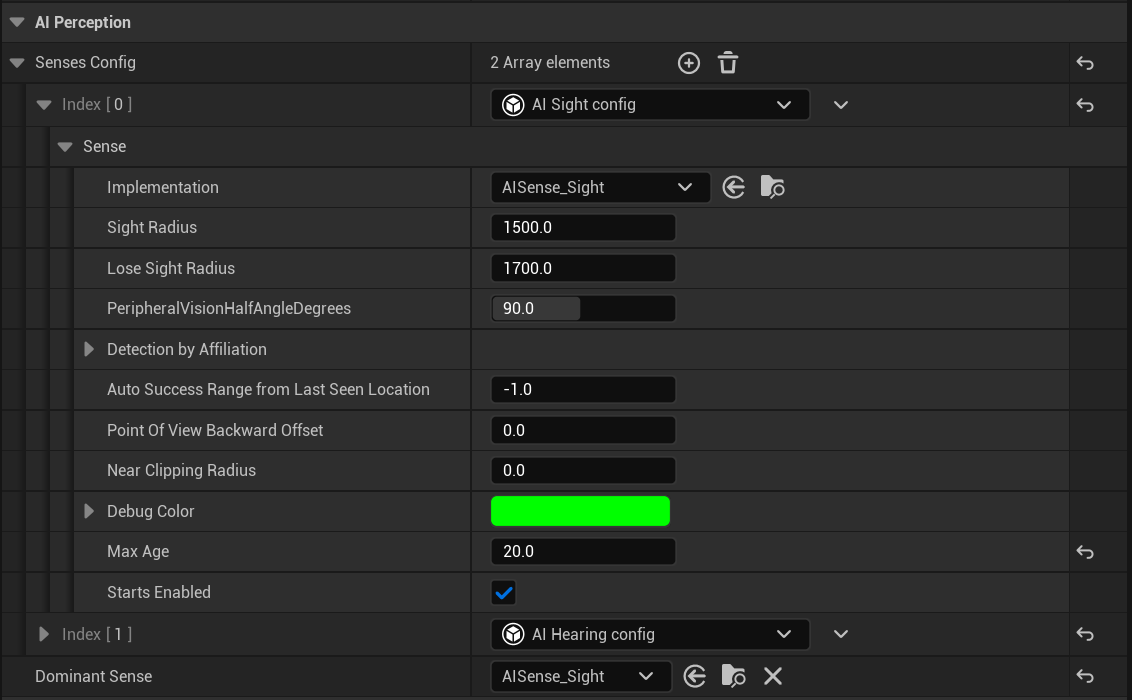
Sight Radius is the distance the AI can see in centimeters so 1500 would be 15 meters. You can increase or decrease this value as you need. You will also need to change the Loss Sight Radius value as well I recommend just keeping it 500 more then your Sight Radius.
Finally in the BP_MasterAIController in the Class Defaults change the Starting Sight Radius to the same value you set the Sight Radius as.
AI Spacific Sight Distances
If you want to have different Sight Distance settings for a spacific AI character you can right click the BP_MasterAIController in the Content Browser and select Create Child Blueprint Class and name the new blueprint.
Then open that new blueprint and follow the steps in the first section of this guide to change its Sight Distance settings.
Then open the AI character blueprint that you want to use those Sight Distance settings, so for example the BP_Zombie, in the Class Defaults search for Controller and set the AI Controller Class to the new blueprint you created.
Hearing Distances
If you want to know how to change the Hearing Distances check out the guide linked below.
 Defuse Studios